I’m creating a tutorial that includes a video and files used regarding V14 rendering.
Below is the video for the tutorial. I should have 1639 and the example file folder also available shortly.
I will update this post as the items become available.
V14 Rendering (ViaCAD Pro, SharkCAD, TurboCAD Mac Pro | Mac/Windows)http://www.csi-concepts.com/Demo/videos/v14/V14RenderVideo.mp4
V14 Render Tutorial Files http://www.csi-concepts.com/Demo/misc/V14RenderTutorial.zip
Build 1639 is ready for WIP testing. Please let me know if there are any issues with the instructions to render such that I can update the video.
Tim
Excellent Tim, Thank you very much.
If anyone comes up with some interesting renderings please post and share!
For example different material types for the platter or glass. Or different HDR from https://polyhaven.com/hdris
Tim
Very nice Tim,
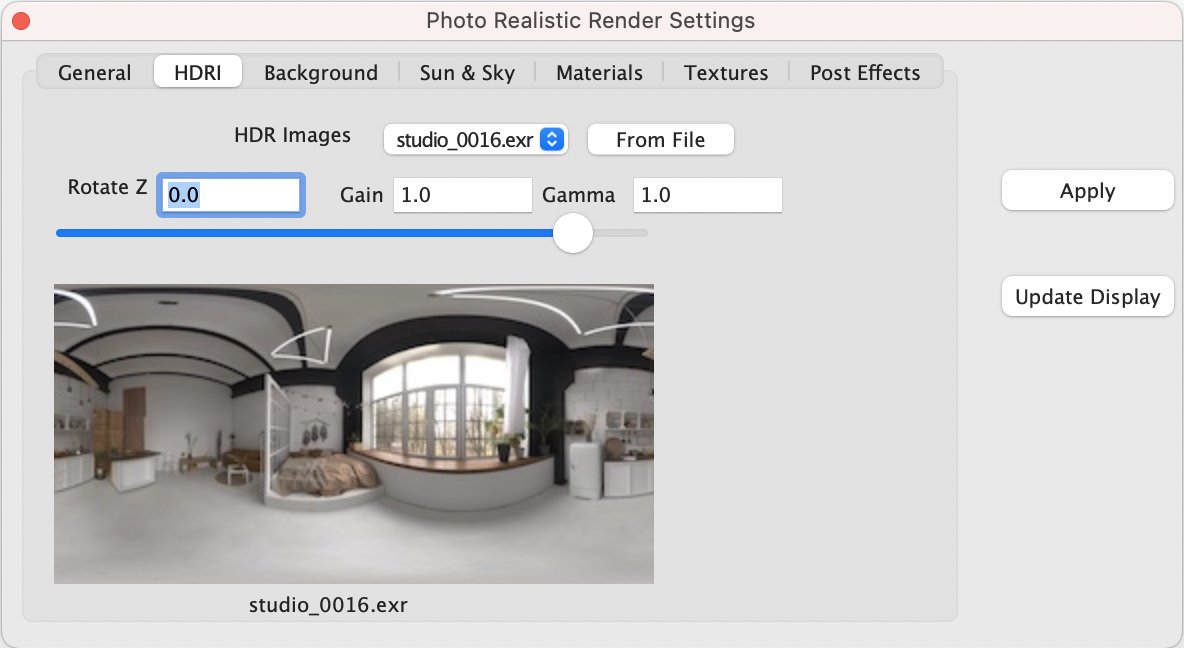
Where is the Studio_0016.exr ?..ok With Build 1639 !!!
Where is the Studio_0016.exr ?.
This is a new HDR that was added in build 1639.
Tim
Thanks Tim !
Yes - I downloaded 1639.
1- Can we import exr file, example from my keyShot file. (I tried without success)
2- Denoise enable = no render… Black Screen or render with my model in black
Update…
Sorry Tim !!!
1- I was able to import correctly a .exr file. But no preview in the set up window !!
I was able to import correctly a .exr file. But no preview in the set up window !
Mac/Windows cannot create a preview of an .exr file (convert exr to png). But you should see a generic image in the preview with the exr name.
If a scene is coming up all black, it does not have a light source.
Tim
24c
August 25, 2023, 5:41pm
9
@Tim
Not sure what you mean, but macOS Ventura will open a .exr file, using Preview, and can Export as HEIC, PNG, Open EXR, TIFF or a few other formats.
Mike
Where can I find Build 1639? I’m running 1621 and was trying to play with rendering. I don’t have the .exr files and if I try to render it just comes up black.