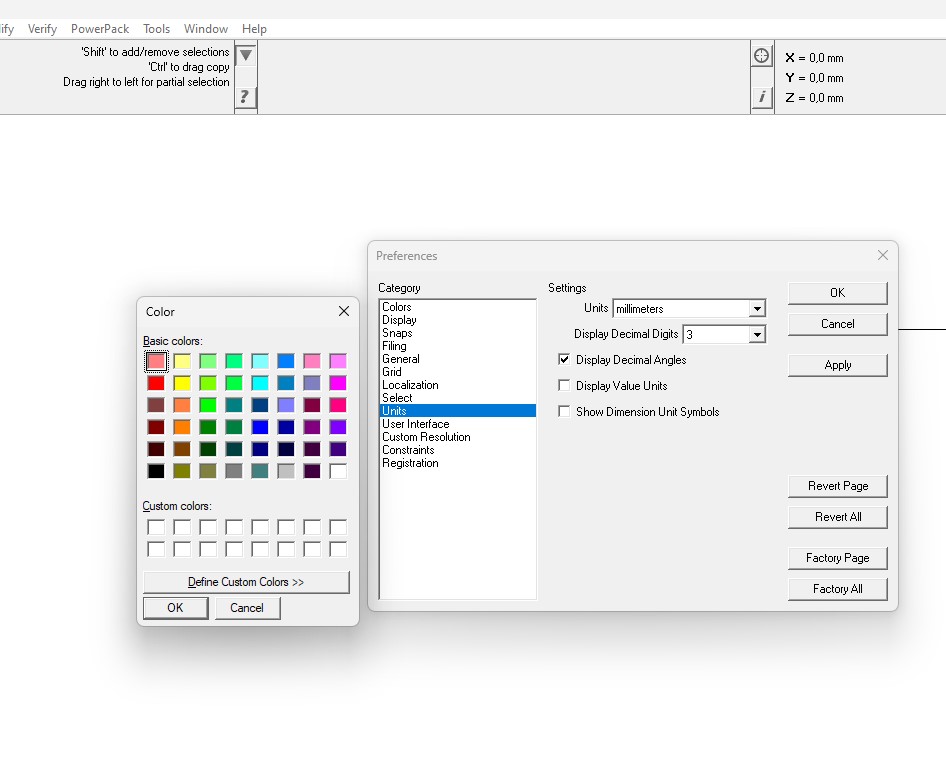
Is anyone else having problems saving default settings under preferences or the default settings in the inspector?
Can anybody else repeat this result?
1 File , top left drop down, select preferences,
2 go to filing, check the auto save box.
3 select from any of the 3 choices.
4 change a value and hit enter on your key board ( don’t select the apply button top right on the palette)
On my system the colour palette picker pops up.
Also happens on snaps, if I change the hit radius again the colour palette pops up,
under units, display decimal units. from the drop down select a value hit enter, the palette pops up.
Windows 11 home
Beta 1643 (but it has been happening with previous betas and possibly versions)
It must be a PC issue. It never happened on my Mac, and I can’t repeat your steps.
Though there are several other unwanted events on a Mac :
a dotted construction line appearing when I hit the command key after changing layers names
collapsed pallets moving a few pixels away when I close the software and reopen it : impossible to uncollapse unless moving manually the few pixels back…
the dotted construction line is possibly an annoying “keyboard shortcut” because it happens to me, and sometimes you get multiple duplicates, laid over each other.
I’ve had as many as twenty, and I never managed to select all of them and delete them in one hit. It’s laborious cleaning up the drawing afterwards, but thanks for the post as now I know miss hitting the command key with another is causing it.
On Mac there are problems with the individual tool settings reverting to defaults. I asked Tim to have a look but I think it’s all about the next version now.